Topic: DMD0510

SGRST - Disable Stage


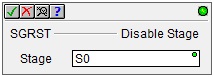
The Disable Stage (SGRST) instruction is used to disable the target Stage.


If the current Stage is specified as the target Stage, when the Disable Stage instruction is executed, it does NOT cause an immediate jump to the next Stage that is enabled, it only disables the target Stage. This means that any ladder logic instructions between the Disable Stage instruction and the end of the Program code block will still be executed.
 

Note: All Stage programming instructions must be entered in a Program code block; Stage instructions cannot be placed in a Task code block.


For a complete discussion on Stage Programming concepts and how to use the Stage programming instructions effectively, refer to the Help Topic on Stage Programming Concepts.

Parameters:

Note: Use the F9 key (Element Browser) or Down-Arrow key (Auto-Complete) at any time to see a complete list of the memory locations that are valid in the current field of the instruction.


Stage - designates the target Stage to disable. The target Stage reference can be entered using its fully qualified name - for example MyProgram.S0 through MyProgram.S127 - or simply its Stage number - S0 through S127.


Note: To switch between displaying the fully qualified Stage reference ($Main.S0) and the abbreviated name (S0), go to the View-> Options -> Ladder Tab and check the option under the Misc. Options to 'Abbreviate Stage Names (Use S0 over $Main.S0)'.


Note: Stage programming instructions can only reference Stages in the same Program code block, they cannot reference Stages in a different Program code block.


Status Display:

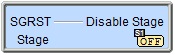
The Status display of the Disable Stage instruction will indicate the ON/OFF condition of the Stage bit.

See Also:

Stage Instructions in the Do-more Controller


Related Topics:

Stage Programming Concepts

Introduction


Example 1 - A Simple 2-State Process


Stage Transition Instructions


Example 2 - A Lamp On/Off Controller


Example 3 - A Garage Door Opener


Review - Steps to Writing Successful Stage Programs


Example:

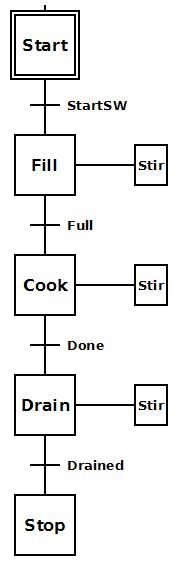
Description of a Disable Stage Diagram:

To the right is a stage diagram of a sequence control that fills a vessel with product, cooks it, and then drains it. At periodic times during the filling, cooking or draining, the process enables a stir paddle.
 

'Start' is the initial stage and awaits for the StartSW to come ON. When it does, transition is made to stage 'Fill'.


Stage 'Fill' turns on the pump to fill the vessel with product. While it is flowing in, stage 'Stir' is periodically enabled. It disables itself. When the vessel is full transition is made to stage 'Cook'.


Stage 'Cook' turns on the heaters and cooks the product in the vessel. While it is cooking, stage 'Stir' stage is periodically enabled. It disables itself. When the product is cooked transition is made to stage 'Drain'.


Stage 'Drain' opens the valve at the bottom of the vessel to allow the cooked product to drain out. While it is draining, 'Stir' stage is periodically enabled. It disables itself. When the product is drained transition is made to stage 'Stop'.


Stage 'Stop' exits the Program code block.


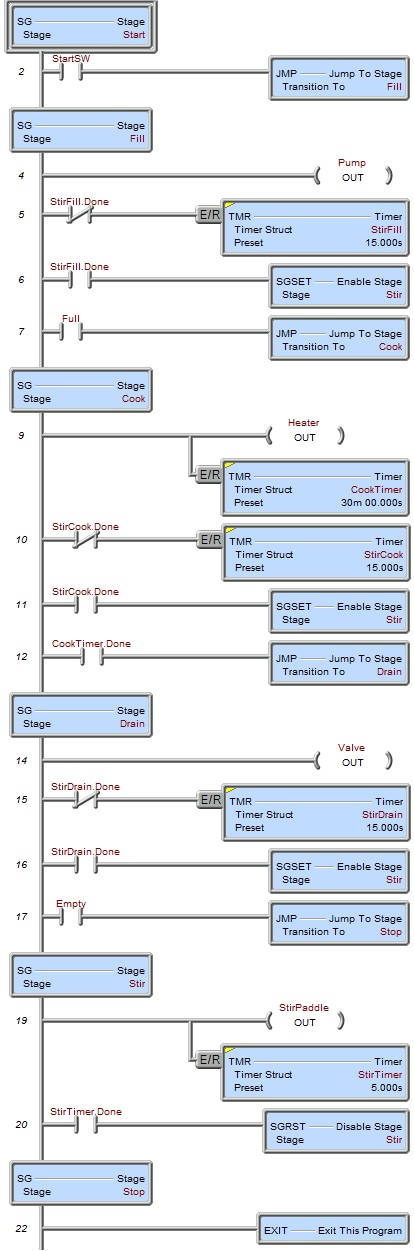
Ladder Logic for the above Stage Diagram:

To the right is a ladder logic equivalent to the above stage diagram.


Once the Program code block containing this stage is first enabled to run, the initial stage 'Start' will be enabled to run. Once StartSW comes ON transition is made to stage 'Fill'.


When stage 'Fill' is enabled the Pump comes ON and begins filling the vessel with product. The StirFill timer begins to run until 15 seconds is reached. When StirFill.Done bit comes ON the SGSET instruction enables stage 'Stir' to run without disabling stage 'Fill'. The StirFill timer resets itself and begins timing again for another 15 seconds. This periodic enabling of stage 'Stir' continues during the entire time stage 'Fill' is running. When the product reaches the top of the vessel, the Full sensor comes ON and transition is made to stage 'Cook'. When stage 'Fill' is disabled, the Pump will turn OFF and the StirFill timer will be reset.


When stage 'Cook' is enabled the Heater comes ON and begins cooking the product in the vessel. The CookTimer starts timing for a cook-time of 30 minutes. The StirCook timer begins to run until 15 seconds is reached. When StirCook.Done bit comes ON the SGSET instruction enables stage 'Stir' to run without disabling stage 'Cook'. The StirCook timer resets itself and begins timing again for another 15 seconds. This periodic enabling of stage 'Stir' continues during the entire time stage 'Cook' is running. When the CookTimer finishes, the CookTimer.Done bit comes ON and transition is made to stage 'Drain'. When stage 'Drain' is disabled, the Heater turns OFF and the CookTimer and StirCook timers will be reset.


When stage 'Drain' is enabled the Valve comes ON (opens) and begins emptying the vessel of product. The StirDrain timer begins to run until 15 seconds is reached. When StirDrain.Done bit comes ON the SGSET instruction enables stage 'Stir' to run without disabling stage 'Drain'. The StirDrain timer resets itself and begins timing again for another 15 seconds. This periodic enabling of stage 'Stir' continues during the entire time stage 'Drain' is running. When the product reaches the bottom of the vessel, the Empty sensor comes ON and transition is made to stage 'Stop'. When stage 'Drain' is disabled, the Valve will turn OFF (close) and the StirDrain timer will be reset.


When stage 'Stir' is enabled to run it turns ON the StirPaddle motor so the product can be stirred during the filling, cooking and draining stages. The StirTimer is used to allow the StirPaddle motor to run for 5 seconds. When StirTimer.Done bit comes ON the SGRST instruction disables stage 'Stir' stage. When stage 'Stir' is disabled the StirPaddle will turn OFF and the StirTimer will be reset.


Stage 'Stop' exits the Program code block.


Copyright Host Engineering, Inc. ALL RIGHTS RESERVED