Topic: DMD0509
SGDIVRG - Jump to Multiple Stages
The Jump to Multiple Stages (SGDIVRG, "Stage Diverge") instruction is used to transition from one stage to multiple stages by disabling the Stage which contains the SGDIVRG instruction and enabling all of the target Stages that are specified in the SGDIVRG instruction.
When the Jump To Multiple Stages (SGDIVRG) instruction is executed, it does NOT cause an immediate jump to the target Stages, it disables the current Stage and enables the target Stages. The effect of this instruction will occur the next time those Stages are normally processed as part of the controller's scan. This means that any ladder logic instructions between the Jump To Multiple Stage (SGDIVRG) instruction and the end of the Stage will still be executed.
Note: All Stage programming instructions must be entered in a Program code block; Stage instructions cannot be placed in a Task code block.
For a complete discussion on Stage Programming concepts and how to use the Stage programming instructions effectively, refer to the Help Topic on Stage Programming Concepts.
Parameters:
Note: Use the F9 key (Element Browser) or Down-Arrow key (Auto-Complete) at any time to see a complete list of the memory locations that are valid in the current field of the instruction.
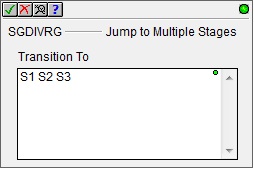
Transition To - designates the list of target Stages for the transitions. The target Stage references can be entered using their fully qualified names - for example MyProgram.S0 through MyProgram.S127 - or simply their Stage numbers - S0 through S127.
Note: To switch between displaying the fully qualified Stage reference ($Main.S0) and the abbreviated name (S0), go to the View-> Options -> Ladder Tab and check the option under the Misc. Options to 'Abbreviate Stage Names (Use S0 over $Main.S0)'.
Note: Stage programming instructions can only reference Stages in the same Program code block, they cannot reference Stages in a different Program code block.
Status Display:
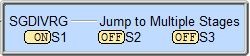
The status display of the Jump to Multiple Stages (SGDIVRG) lists each Stage and whether or not that Stage is enabled.
See Also:
Stage Instructions in the Do-more Controller
SGDIVRG - Jump to Multiple Stages
Related Topics:
Stage Programming Concepts
Example 1 - A Simple 2-State Process
Stage Transition Instructions
Example 2 - A Lamp On/Off Controller
Example 3 - A Garage Door Opener
Review - Steps to Writing Successful Stage Programs
 To the right is a stage diagram of a sequence control
that branches out into 3 simultaneous operations that would fill a vessel
with product, cook its contents and stir it all at the same time until
completion. Each parallel process independently ends itself. When all
3 are complete, the process converges to one stage in order to drain.
Once the product is completely drained it is stopped.
To the right is a stage diagram of a sequence control
that branches out into 3 simultaneous operations that would fill a vessel
with product, cook its contents and stir it all at the same time until
completion. Each parallel process independently ends itself. When all
3 are complete, the process converges to one stage in order to drain.
Once the product is completely drained it is stopped. To the right is a ladder logic equivalent to the
above stage diagram.
To the right is a ladder logic equivalent to the
above stage diagram.