News:

  • September 22, 2026, 10:27:39 AM

Login with username, password and session length

Author Topic: Known Criticial Issues as of April 24, 2019  (Read 24149 times)

franji1

  • Bit Weenie
  • Host Moderator
  • Hero Member
  • *****
  • Posts: 3847
    • Host Engineering
Known Criticial Issues as of April 24, 2019
« on: September 28, 2015, 02:30:19 PM »
This Topic is a frozen topic that lists all known critical issues with specific versions of Do-more and Do-more Designer, along with any possible work-arounds until the issue is resolved.

It is frozen so that no one can post additional replies or create new threads within this topic.  By restricting this topic, it can remain streamlined to make it easy for everyone to navigate all of the known critical issues.

If you wish to discuss any of the issues posted within this topic, feel free to start a new topic to discuss your specific concerns!  As always, if you find any other new issues, we definitely want to know about those ASAP, so feel free to create new topics about those too.

Click here to start a New Topic in the Do-more CPUs and Do-more Designer Software forum.
« Last Edit: October 14, 2015, 01:45:13 PM by franji1 »

franji1

  • Bit Weenie
  • Host Moderator
  • Hero Member
  • *****
  • Posts: 3847
    • Host Engineering
FIXED 1.4.x Instability after Program Changes w/Documentation Editor Opened
« Reply #1 on: September 28, 2015, 02:35:15 PM »
Issue: Sometimes after hitting F8-Accept Rungs or after a Replace, if the Documentation Editor was opened, Designer could become unresponsive and/or crash.

Work-Around: Do not have the Documentation Editor opened while making program changes.  But there is a fix (see below).

Fix: This issue was fixed in Designer 1.4.3
« Last Edit: September 20, 2017, 03:56:36 PM by franji1 »

franji1

  • Bit Weenie
  • Host Moderator
  • Hero Member
  • *****
  • Posts: 3847
    • Host Engineering
Issue: When editing an existing INIT instruction that has a missing End: field in one of the rows, Designer would crash upon entry to the editor.

Work-around: If you only want to initialize a single element, you need to also specify an End field that matches the Start field.  Create a new instance of the INIT instruction with all the same parameters as the old one, but fill in the End field of any single element rows.  Then delete the old INIT instruction.  But there is a fix (see below).

Fix: This issue was fixed in Designer 1.4.3
« Last Edit: September 20, 2017, 03:56:19 PM by franji1 »

franji1

  • Bit Weenie
  • Host Moderator
  • Hero Member
  • *****
  • Posts: 3847
    • Host Engineering
FIXED 1.4.x Designer may crash when closing a floating Data View
« Reply #3 on: October 14, 2015, 03:16:23 PM »
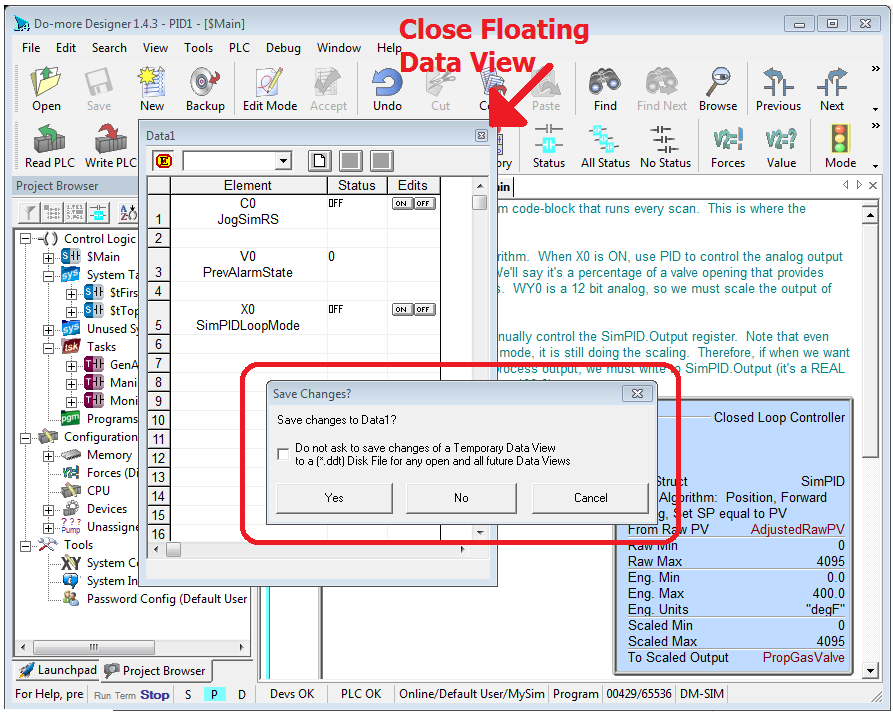
Issue: When closing a Data View, sometimes the Save Changes confirmation dialog appears.  A crash may occur after dismissing the Save Changes confirmation dialog when closing a floating Data View.

An example of this situation is shown below:


There are two work-arounds.

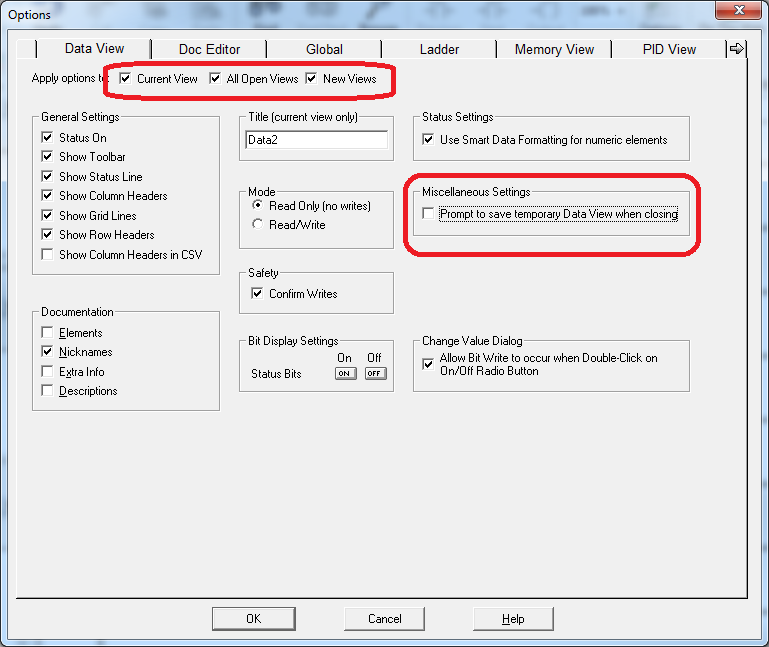
Work-around #1: Disable the Save Changes confirmation dialog.  To disable this confirmation dialog
1. Right Click on a Data View and select Options in the right-click menu OR bring up the Options dialog via the View->Options menu, then click on the Data View tab of the Options dialog
2. In the Apply Options to checkbox group, check as many as you can (especially New Views)
3. UNcheck the Prompt to save tempoarary Data View when closing checkbox
4. Shut down all Designer sessions and re-start them

Work-around #2: Only use docked Data Views (not floating views).

Fix: This issue was fixed in Designer 2.0

« Last Edit: September 20, 2017, 03:55:38 PM by franji1 »

franji1

  • Bit Weenie
  • Host Moderator
  • Hero Member
  • *****
  • Posts: 3847
    • Host Engineering
FIXED 2.0.2 or 2.0.1 does not correctly download 1.4 disk projects
« Reply #4 on: February 24, 2017, 03:11:14 PM »
2.02/2.01 Issue (fixed in 2.0.3): After opening a 1.4 Project from Disk using Designer 2.0.1 or 2.0.2, then immediately writing that program to an H2-DM1x or T1H-DM1x PLC without changing the Memory Configuration, the Program memory can become corrupted, but you may not notice it until you re-connect to your PLC.  Update to Designer 2.0.3 before using it with existing 1.4 Projects.

If this has already happened to your H2 or T1H PLC with 2.0.1 or 2.0.2 (it's easy to check, just look at your project in the PLC and make sure you can open all your code-blocks), your disk project should still be OK.  Make sure your DISK project is OK using 2.0.3.

But you need to clear your PLC completely using the dipswitches before writing the 1.4 project using 2.0.3 (see Help Topic DmD0266 Onboard Dip Switches - Clear All section near the bottom for step-by-step instructions).  Make note of the PLC's IP Address/Subnet Mask/Gateway, and any User Passwords.

After clearing your PLC using the dipswitches, re-open your disk project with 2.0.3 and make sure you choose FROM DISK.  If your disk project contents are lost, look at restoring one of your backups, which are automatically created by Designer (it saves the last 4 versions of your disk project by default).  Look in the menu File->Manage Projects->Restore from Backup in Designer 2.0.  If nothing is there, try restoring the project file from within Designer 1.4.

Fix: This issue was fixed in Designer 2.0.3  Click here to download the latest version (all updates are free).
« Last Edit: September 20, 2017, 03:55:27 PM by franji1 »

franji1

  • Bit Weenie
  • Host Moderator
  • Hero Member
  • *****
  • Posts: 3847
    • Host Engineering
FIXED 2.0.3/2.0.2 RX/WX Instruction Editor Issue
« Reply #5 on: May 01, 2017, 08:40:51 AM »
2.0.3/2.02 Issue: When modifying an existing RX/WX Do-more Network Read/Write instruction, the secondary dialogs' ("Read From Remote Into Local" and "Write From Local Into Remote") Remote ID and Number of Elements fields do NOT initially load with the original values, but actually reset to their default values (Remote ID of 0 and Number of Elements to 1).

So in the example below, the existing RX instruction has one entry to Read 10 elements from the remote system starting at D5 (so a range of D5 thru D14) locally into D100 (thru D109).  But when you hit the Edit button for that row to modify that entry and bring up the Read From Remote Into Local dialog, you see that the Read From Remote ID numeric edit field is 0, but it should have been the value 5 (D5); and also that the Number of Elements numeric edit field is 1, but it should have been the value 10.


Fix: This issue was fixed in Designer 2.1  Click here to download the latest version (all updates are free).
« Last Edit: September 20, 2017, 03:55:16 PM by franji1 »

franji1

  • Bit Weenie
  • Host Moderator
  • Hero Member
  • *****
  • Posts: 3847
    • Host Engineering
2.0.3/2.0.2/2.0.1: When you write a CALL to Subroutine instruction to the PLC that contains an Input Parameter row that consists of a Range of Bits that are set to 1 (ON), it gets downloaded to the PLC correctly.

However, when that instruction is read back from the PLC, it is incorrectly decoded as a Range of bits that are set to 0 (OFF), not set to 1 (ON).

If you had a corresponding disk project, you will be notified of the differences, but it can be difficult to determine this subtle difference.  Regardless, when READING the CALL with a RANGE OF BITS SET TO 1, it will incorrectly change it to a RANGE OF BITS SET TO 0.

The screen shot below shows the situation.  The top instruction shows the initial CALL with a range of 10 bits C0 thru C9 being passed a value of 1.  The bottom instruction shows how that CALL will be read back from the PLC.


Note: Initially, the range of bits set to 1 is written correctly to the PLC, so the CALL will behave as desired.  However, when you READ that program from the PLC, that parameter will be incorrect, and will need to be modified by the user back to a range of bits set to 1 before being written back to the PLC.

The CALL works correctly with a range of bits set to 0, and it works correctly with single bit parameters that are set with constant 0 or 1 or another bit element.

Fix: This issue was fixed in Designer 2.1  Click here to download the latest version (all updates are free).
« Last Edit: September 20, 2017, 03:55:05 PM by franji1 »

franji1

  • Bit Weenie
  • Host Moderator
  • Hero Member
  • *****
  • Posts: 3847
    • Host Engineering
FIXED 2.1.1/2.1.2 Misreports DmT 2.1 Program Check Rule, Canceling Download
« Reply #7 on: October 12, 2017, 09:07:47 AM »
2.1.1/2.1.2: When attempting to write a project to a PLC with Do-more Technology version 1.x or 2.0 (i.e. prior to DmT 2.1) using Do-more Designer 2.1.1 or 2.1.2, you will always get a Program Check rule violation regarding the need for DmT 2.1 when you have one of the new BRX Analog modules.  Due to this rule violation, Designer cancels the download operation.  This Program Check error comes up regardless of your hardware or the existence of the module, that is, it shows up for Do-more 205, Terminator, and on BRX systems that do not have an Analog module.

This issue has been fixed in Do-more Designer 2.1.3, which is available here.
« Last Edit: October 12, 2017, 10:43:08 AM by franji1 »

franji1

  • Bit Weenie
  • Host Moderator
  • Hero Member
  • *****
  • Posts: 3847
    • Host Engineering
2.1.3, 2.1.2, 2.1.1, 2.0.x: When data types change size (specifically User Data Types definitions, and configurable BRX High Speed Counter Timer structures), any corresponding memory data-blocks or heap-item sizes were NOT being adjusted.  Designer 2.1.4 reflects any dynamic data-type size changes back to all of their memory data-blocks and heap-items.

This issue has been fixed in Do-more Designer 2.1.4, which is available here.

franji1

  • Bit Weenie
  • Host Moderator
  • Hero Member
  • *****
  • Posts: 3847
    • Host Engineering
FIXED Simulator behaving strangely
« Reply #9 on: April 24, 2019, 09:56:54 AM »
2.5.1, 2.4, 2.3: The Simulator's state files and SD card content were always being written to the Designer 2.2 Public bin folder, instead of the specific Designer version's Public bin folder.  If Designer 2.2 was installed, this caused possible incompatibilities between 2.3, 2.4, and 2.5 Simulator EXEs since they were all using the same set of state files.  If Designer 2.2 was NOT installed, the Simulator would never remember the project contents, state, or settings, and the SD Card file system reported errors.

This issue has been fixed in Do-more Designer 2.5.2, which is available here.
« Last Edit: April 24, 2019, 10:16:34 AM by franji1 »

franji1

  • Bit Weenie
  • Host Moderator
  • Hero Member
  • *****
  • Posts: 3847
    • Host Engineering
FIXED Designer sometimes crashed when editing System Configuration
« Reply #10 on: April 24, 2019, 10:05:28 AM »
2.5.1: When modifying some module configurations from within the System Configuration dialog, the software would sometimes crash as you exited the System Configuration dialog.  Modifying module configurations from the Dashboard was OK.

This issue has been fixed in Do-more Designer 2.5.2, which is available here.
« Last Edit: April 24, 2019, 10:16:20 AM by franji1 »

franji1

  • Bit Weenie
  • Host Moderator
  • Hero Member
  • *****
  • Posts: 3847
    • Host Engineering
2.5.1: When you opened a project file that had its workspace layout such that the I/O System View was part of a tab group but was not visible (e.g. Data View tab was selected in the same tab group), Do-more Designer would become unresponsive.

This issue has been fixed in Do-more Designer 2.5.2, which is available here.
« Last Edit: April 07, 2020, 09:30:25 AM by franji1 »


Sorry, this topic is locked. Only admins and moderators can reply.