Topic: DMD0179
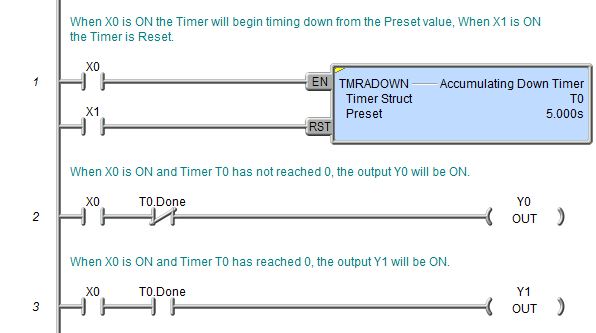
TMRADOWN - Accumulating Down Timer
The Accumulating Down Timer (TMRADOWN) is a two input leg timer that starts timing from the Preset value down toward 0 when the enable leg (EN) is ON and stops timing when the enable leg (EN) is OFF, without resetting the time. The reset (RST) input will reset the timer, which sets the accumulator value (.Acc) to the Preset value, not 0.

Parameters:
Note: Use the F9 key (Element Browser) or Down-Arrow key (Auto-Complete) at any time to see a complete list of the memory locations that are valid in the current field of the instruction.
Timer Struct - specifies a unique Timer structure that will be used by this instruction.
Preset - is the amount of time after which you want some action to take place. The Accumulating Down Timer has a resolution of 1 millisecond. The maximum value for a Timer Preset is 2,147,483,647 milliseconds. The Timer value can be specified in one of two ways:
Constant - specified using the Time format (HH : MM : SS : mmm).
The maximum Time value in this form is 569
hours, 31 minutes, 23 seconds, and 647 milliseconds. If needed, the value
entered for the Timer Preset will be normalized to its standard value.
For example, if you entered a value of
When editing the Constant Preset value, the following keystrokes are available
to make entering the value easier and faster:
h - takes you to the Hours field
m - takes you to the Minutes field
s - takes you to the Seconds field
mm - takes you to the Milliseconds field

Variable - designates a location that contains the total number of milliseconds desired for the Preset. This can be any readable numeric location.

Status Display:
The yellow triangle in the upper left corner indicates this is a Multi-Scan instruction.
The Accumulating Down Timer (TMRADOWN) has the following two ladder logic input legs:
The first input leg (EN) enables and disables the Accumulating Down Timer. If this input logic is ON, the Accumulating Down Timer will begin timing down from the Preset value. When this input logic is OFF, the Accumulating Down Timer will stop timing, but the accumulator and the status flags will retain their current values. If this input logic comes back ON, the Accumulating Down Timer will continue to time down.

The second input leg (RST) is the Timer Reset. If this input logic is ON the Accumulating Down Timer will reset and the accumulator value will return to the Preset, not 0.
The Accumulating Down Timer instruction provides several status values that can be used elsewhere in your ladder program. Their values are updated each time the TMRADOWN instruction is processed. The syntax for using them is <timer struct>.<flag name>, for example, T7.Acc.
- .Acc (Accumulator)
- a 32-bit signed value that represents the time remaining to reach 0
- .Done - is ON any
time the Accumulating Down Timer's input logic is ON and it's accumulator
value (.Acc) is 0
- .Reset - is ON
if the reset (RST) leg's logic is ON, or if the Accumulating Down Timer
is being reset by an RSTT instruction
.Zero - is ON any time the Accumulating Down Timer's accumulator value (.Acc) is 0
- .Timing - is ON if the Accumulating Down Timer is enabled and the accumulator value (.Acc) is not 0
See Also:
TMRADOWN - Accumulating Down Timer
Rung Example: