Topic: DMD0062
DEVREAD - Read Device Register
The Read Device Register (DEVREAD) instruction is used to read the contents of a register in a Device. The individual registers that can be read, and what those values mean are defined by the Device that is being accessed.
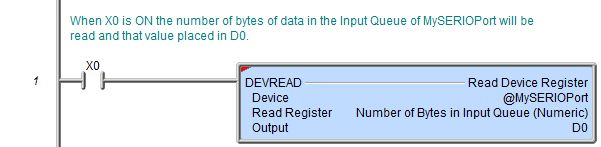
The red triangle in the upper left corner indicates this is a Fully Asynchronous instruction.
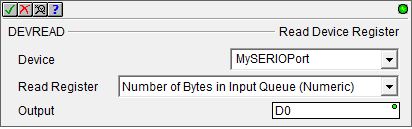
Parameters:
Note: Use the F9 key (Element Browser) or Down-Arrow key (Auto-Complete) at any time to see a complete list of the memory locations that are valid in the current field of the instruction.
Device - designates which of the configured Devices, or which Device Reference to read from.
No devices
available - indicates there is no device that is appropriate for
this instruction. Select one of the following to create the required device:
create device - select this option to invoke the Device Configuration dialog of the System Configuration to create a new device of the appropriate type
create module - select this option to invoke the Module Configuration dialog of the System Configuration to create a new module configuration that can provide a device of the appropriate type
Read Register - designates which
register in the Device to read
If the Device is the Onboard Serial port or a port on a SERIO module, the following options are valid:
Number of Bytes in Input Queue (Numeric) - will return a DWord containing the number of bytes of data currently in the serial port's input buffer
Number of Bytes in Output Queue (Numeric) - will return a DWord containing the number of bytes of data currently in the serial port's output buffer
Serial Port Status (Numeric, 32, Bit of Word) - a DWord that contains the following bits:
0x01 = the CTS line of the serial port is
asserted
0x02 = reserved
...
0x32 = reserved
If the Device is a UDP Connection the following options are valid:
Is Packet Available (bit) - will return a single bit value indicating whether a packet is present in the input queue
If the Device is a TCP Client Connection the following options are valid:
Number of Bytes in Input Queue (Numeric) - will return a DWord containing the number of bytes of data currently in the Ethernet port's input buffer
Number of Bytes in Output Queue (Numeric) - will return a DWord containing the number of bytes of data currently in the Ethernet port's output buffer
If the Device is a TCP Server Connection the following options are valid:
Number of Bytes in Input Queue (Numeric) - will return a DWord containing the number of bytes of data currently in the Ethernet port's input buffer
Number of Bytes in Output Queue (Numeric) - will return a DWord containing the number of bytes of data currently in the Ethernet port's output buffer
Output - designates a location to store the value that has been read from the Device. This can be any writable numeric location. To reference a bit value in a numeric element use a bit cast operation. For example, use D10:0 to reference bit 0 of DWord D10, use D8:31 to reference bit 31 of DWord D8.
See Also:
DEVREAD - Read Device Register
Related Topics:
For more information on Devices, Device References, and how to configure them go to the Device Configuration Section under System Configuration.
Rung Example: