Topic: DMD0075
RD - Read from Intelligent Module
The Read from Intelligent Module (RD) instruction is used to read a specified number of data bytes from the shared RAM memory of an intelligent Module and store that data in the memory of the Do-more controller.
Read from Intelligent Module (RD) is a Multi-Scan instruction.
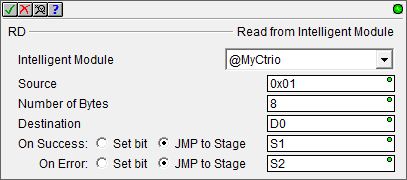
Parameters:
Note: Use the F9 key (Element Browser) or Down-Arrow key (Auto-Complete) at any time to see a complete list of the memory locations that are valid in the current field of the instruction.
Intelligent Module - selects which module to read from
No devices
available - indicates that there are no Intelligent Modules in
the system. Select
create module - select this option to invoke the Module Configuration dialog of the System Configuration to create a new module configuration
Source - designates the beginning address of the data in the module to start reading from. This can be any positive constant integer from 0 to 2147483647, or any readable numeric location. For details on specific source addresses for specific modules, reference the user manual for that specific module.
Number of Bytes - designates the number of bytes of data to read from the module. This can be any positive constant integer from 1 to 2147483647, or any readable numeric location.
Destination - designates the starting location to store the data read from the module. This can be any writable numeric location.
On Success: - designates one of the following two options if the Read from Intelligent Module operation is successful:
SET BIT - The specific BIT location will be SET OFF when the Read from Intelligent Module (RD) instruction is first enabled, and then SET ON if the operation is successful. This value can be any writable bit location.
JMP to Stage - JMP to the specified Stage. The target Stage must be in the same Program as the Read from Intelligent Module (RD) instruction, you cannot specify a Stage in a different Program. This selection will function the same as a standalone Jump to Stage instruction. Click here for more information on the Jump To Stage instruction.
On Error: - designates one of
the following two options if the Read from Intelligent Module operation
is unsuccessful:
SET BIT - The specific BIT location will be SET OFF when the Read from Intelligent Module (RD) instruction is first enabled, and then SET ON if the operation is unsuccessful. This value can be any writable bit location.
JMP to Stage - JMP to the specified Stage. The target Stage must be in the same Program as the Read from Intelligent Module (RD) instruction, you cannot specify a Stage in a different Program. This selection will function the same as a standalone Jump to Stage instruction. Click here for more information on the Jump To Stage instruction.
See Also:
Rung Example:
Traditionally this instruction was used to manage intelligent modules at runtime. Do-more controllers provide a complete interface to the configuration and runtime configuration through the System Configuration or through other instructions.
This instruction remains as part of instruction set in case there are instances in the future when this functionality is again required.