Topic: DMD0133
LERP - Linear Interpolation
 The Linear Interpolation (LERP) instruction uses
a table of up to 50 Input / Output data pairs that approximate a function.
It then uses the data points in that table to interpolate or extrapolate
an output value for any given input value.
The Linear Interpolation (LERP) instruction uses
a table of up to 50 Input / Output data pairs that approximate a function.
It then uses the data points in that table to interpolate or extrapolate
an output value for any given input value.
The LERP table must contain at least two Input / Output data pairs, and is limited to 50 data pairs. Each of the data pairs must have a unique Input Point value, and must be sorted into increasing order by those Input Point values. The Input Points and Output Points can be any combination of constants and readable memory locations. The contents of the LERP table can be entered directly through the instruction's editor, or imported from a .CSV or .TXT file.
Some of the traditional uses of this instruction are :
Calibration - any situation where a value requires calibration either from a set of predefined inputs to a set of corresponding calibrated output values, or a set of predefined outputs to a set of corresponding calibrated input values.
Approximating single variable mathematical functions that are not supported by the Do-more Control Engine - given enough (X, Y) data points on a complex mathematical function, LERP can approximate the function. Concentrating data points around regions of the curve where the slope is changing the most will give the best results across the entire range.
Approximating complex single variable mathematical functions that have long execution times in an application where scan time needs to be minimized - when sacrificing some precision for smaller scan times may be acceptable, consider modeling the function using LERP. One optimization in the LERP implementation is it starts its data-point table lookup at the same step as the previous call, since data tends to cluster and input variables tend to move more continuously versus jumping around.
Modeling non-linear process variable - similar to approximating mathematical functions that are not supported by the Do-more Control Engine, if given enough data points of a process variable that doesn't respond linearly across the entire range of the output value that controls or influences it, but where the PV is always increasing or always decreasing across that output range, use LERP to help model a linearizing function of the process variable.
Simple Scaling with Clamping on one or both ends - since the LERP instruction can operate with only two data points, and it supports options to extrapolate or clamp either end.
Row Editor Keys:
The following functions are used to add or remove rows, edit existing rows or reorganize the rows in the instruction.
Insert - inserts a new Row for a new Input / Output data pair above the current row
Remove - removes the current Input / Output data pair row from the table
Move Up - each time this button is clicked the currently selected Input / Output data pair moves one position toward the top of the LERP table
Move Down - each time this button is clicked the currently selected
Sort - will sort the entire LERP table into increasing order by the values in the Input Point column
Import... - will import the Input / Output data pairs from a file that contains a list of comma separated Input Point numbers and Output Point Values (or any readable numeric location). Each pair of values should be on a separate line.
Refer to the following example:
1, 0.0500
2, 0.0600
3, 0.0610
V0, R0
V1, R107
6, 0.0621
Note: each import operation will result in a LERP table with only the entries contained in the import file, that is, successive imports will not ADD newly imported points to a LERP Table. The data pairs in the input file do not have to be in order, they can be sorted after they are imported. Duplicate Input Point values are not allowed.
Parameters:
Note: Use the F9 key (Element Browser) or Down-Arrow key (Auto-Complete) at any time to see a complete list of the memory locations that are valid in the current field of the instruction.
Input Variable - the input value to the function that the LERP table is modelling. This can be any constant value or any readable numeric location.
Output Variable - the value generated by the LERP function. This can be any writable numeric location.
Input Point - an input value that has a corresponding output value. This can be any constant value or any readable numeric location.
Output Point - the output value that corresponds to input value. This can be any constant value or any writable numeric location.
Output Behavior when Input is Less Than Lowest Input Point - specifies the desired output behavior any time the value of the Input Variable is less than the lowest Input Point value
Clamp to Lowest Output Point - force the Output Variable value to be the same as the lowest Output Point value
Extrapolate using Lowest Two Points - compute the Output Variable value by extrapolation using the two lowest Input / Output data pairs
Output Behavior when Input is Greater Than Highest Input Point - specifies the desired output behavior any time the value of the Input Variable is greater than the highest Input Point value
Clamp to Highest Output Point - force the Output Variable value to be the same as the highest Output Point value
Extrapolate using Highest Two Points - compute the Output Variable value by extrapolation using the two highest Input / Output data pairs
Status Display:
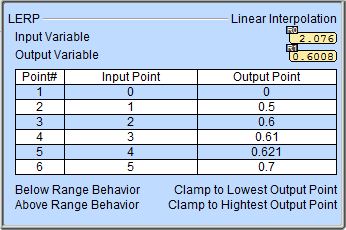
The status display for the Linear Interpolation instruction will display the Input Variable value and the calculated Output Value.
See Also:
Related Topics:
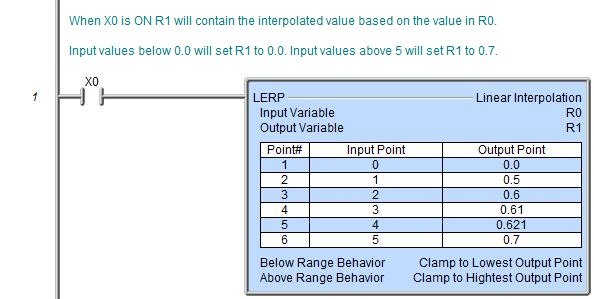
Rung Example: