Topic: DMD0031
CNTDN - Down Counter
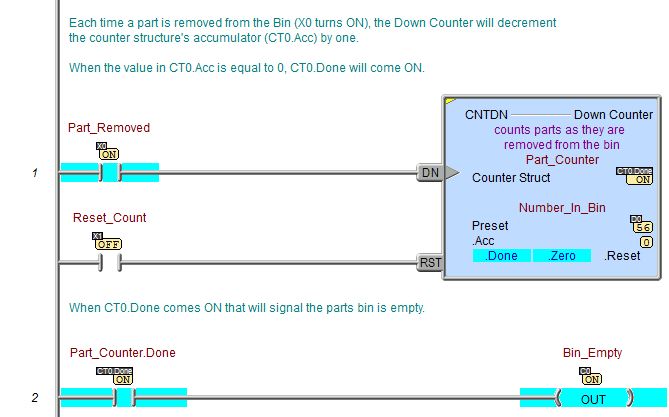
The Down Counter (CNTDN) instruction is a two input counter that counts down from the Preset value to 0. Each time the Down Counter is reset the counter structure's accumulator is initialized with the Instruction's Preset value. Then each time the DN input logic transitions from OFF to ON the counter structure's accumulator (.Acc) is decremented by one. The counter structure's .Done bit will turn ON once the .Acc value reaches 0.

Parameters:
Note: Use the F9 key (Element Browser) or Down-Arrow key (Auto-Complete) at any time to see a complete list of the memory locations that are valid in the current field of the instruction.
Counter Struct - a counter structure that will be used by this Down Counter instruction. By default, there are 255 pre-defined counter structures, named CT0 through CT255. Refer to the Memory Configuration section of the System Configuration for information on adjusting the number of available counter structures.
Preset - the count value at which the Down Counter starts counting. Each time the Down Counter is reset the counter structure's accumulator is initialized with the instruction's Preset value. This can be any positive 32-bit constant value or any readable numeric location.
Inputs Legs:
The Down Counter (CNTDN) has the following two ladder logic inputs:
The first input leg is the Count Down (DN. The gray triangle at the right end of this input leg indicates the input is edge-triggered, meaning that each time this input logic transitions from OFF to ON, the Down Counter's accumulator value will decrement by one.
The second input leg is the Count Reset (RST).
When this input logic in ON, the Down Counter will reset and the counter
structure's accumulator value will return to the Preset Value and will
remain in this state as long as the Reset input remains ON.
Note:
The Reset input has priority over the Down input, meaning that if the
Down input is ON at the same time as the Reset input, the Down Counter
will not count.

Status Display:
The yellow triangle in the upper left corner indicates this is a Multi-Scan instruction.
The counter structure contains several "dot" fields that can be used elsewhere in your ladder program. Their values are updated each time the Down Counter instruction is processed. The syntax for using them is <counter struct>.<flag name>.
- .Acc (Read/write)
- a 32-bit integer value that represents the current number of counts
remaining
- .Done - (Read-only)
is ON any time the value in the counter structure's accumulator (.Acc)
is less than or equal to the 0
- .Reset - (Read-only)
is ON if the RESET logic is ON, or if the Down Counter is being reset
by a Reset Counter (RSTCT) instruction.
At reset the counter structure's accumulator value will be set to the
instruction's Preset value.
.Zero - (Read-only) is ON any time the value in the counter structure's accumulator (.Acc) is 0
See Also:
- CNT - Up Counter
- CNTDN - Down Counter
- UDC - Up/Down Counter
- RSTCT - Reset Counter
Example: